


Amazon Hub
3.384.00 Reviews
App Specs
- Version
- 0.6-633-prod
- Updated On
- License
- Free
- Downloads
- 100,000+
- Developer
- Amazon Mobile LLC
- Categories
- Business
- Platform
- Android
Screenshots

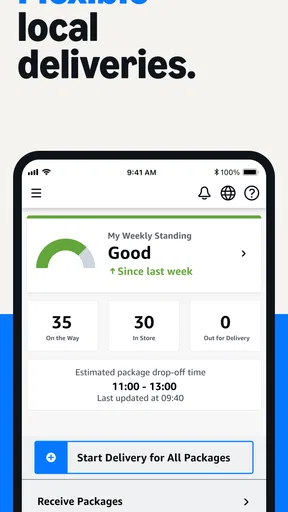

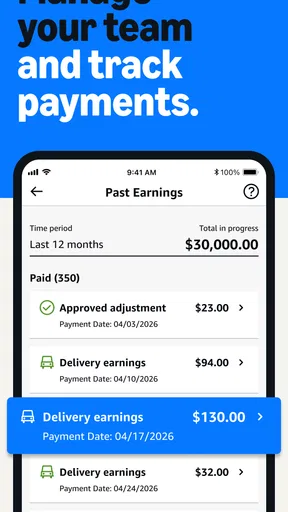
 Analysis by AppCompare
Amazon Hub is a focused business app for organizations that handle Amazon Hub Delivery, pickup, and return work. I approached it less like a general shopping tool and more like a workbench for operational tasks: useful when a business is already part of that Hub workflow, but not especially meaningful for someone who simply wants to track a personal order. Its developer is Amazon Mobile LLC, it is free to use, and its Everyone age rating makes the basic installation approachable for a broad range of users.
My first impression is that the app has a narrow purpose, and that is actually its main strength. Instead of trying to combine shopping, customer service, delivery browsing, and business operations in one place, it is aimed at the people who help manage Hub activity. That focus makes the decision to install it fairly simple: if your work involves receiving, handling, or returning Amazon packages through a participating Hub operation, it may belong on your phone; if not, another Amazon app will probably make more sense.
What the app is really for in daily business work
The phrase “Amazon Hub” can sound broader than the experience itself. In practice, I would think of this as an operational companion rather than a customer-facing marketplace. Its role centers on Hub Delivery, Pickup, and Return operations, so the value comes from having relevant work information available while you are carrying out those duties.
A realistic example would be a small business that serves as a pickup or return point. During a busy part of the day, a staff member may need to move between the counter, a storage area, and the entrance while dealing with several customer requests. A dedicated business app is more practical in that situation than relying on email threads, paper notes, or a general shopping application. The benefit is not entertainment or discovery; it is keeping a particular operational process together on a mobile device.
I also see a useful distinction between this app and the usual alternatives in the business category. A spreadsheet can record activity, but it does not provide the same purpose-built context. A messaging app can help staff communicate, but it can scatter important details across conversations. A general delivery application may be designed for drivers or consumers rather than Hub locations. Amazon Hub sits in a narrower space, which can reduce unnecessary searching when the task matches its intended workflow.
That narrowness also creates an important trade-off. If your business does not actively participate in a Hub operation, installing it will not turn the phone into a universal parcel-management tool. I would skip it for personal package tracking, ordinary Amazon shopping, or broad inventory management. Those jobs call for different tools, and forcing this app into them would likely create more confusion than convenience.
Where its focused design helps
The strongest practical idea here is separation of duties. A person handling Hub work does not necessarily need access to every consumer feature associated with Amazon. Keeping operational activity in its own app can make a shared work phone easier to understand, especially when several employees take turns at the same counter.
Worth Reading Before You Choose

EA SPORTS FC Mobile 26 Is a Bigger Football Game, but It Takes Time

Flipboard Shows What News Apps Must Do Beyond the Feed

Switching to Android Auto Means Rethinking Your Driving Routine

Google Calendar Makes a Crowded Week Easier to Manage

Ludo King Makes the Most of the Minutes Between Plans

Baby Panda World Brings Quick Play to Modern Phones, but Its Game Library Feels Busy
There is also a subtle advantage during handoffs. When one employee finishes a shift and another takes over, a dedicated work tool gives them a common place to continue the process instead of depending entirely on verbal instructions. I would still recommend a clear local procedure for unusual cases, but the app’s business focus should make routine Hub-related work easier to distinguish from unrelated phone activity.
One tip I would give a new user is to treat the app as part of a workflow, not as the whole workflow. Before opening it, know which staff member is responsible for the current Hub task and where physical items are stored. That simple preparation matters because a mobile screen cannot solve a poorly organized counter or an unclear handoff.
Speed expectations during ordinary use
For an app like this, perceived speed is less about flashy animation and more about how quickly a worker can get to the relevant operational screen. I would expect the experience to feel best when the phone is ready, the user is already authorized, and the work is limited to a straightforward Hub task. The app’s value depends on reducing steps at the moment a package or customer is in front of an employee.
I would not judge it by the standards of a social app or a lightweight calculator. Business tools often pause while retrieving current operational information, and that pause can be more noticeable when a user is working in a busy location. The important question is whether the delay is understandable and whether the user can continue confidently afterward. A brief wait is manageable; uncertainty about whether an action was accepted is much more disruptive.
My practical advice is to open the app before the busiest part of a shift rather than waiting until a line forms. This is not a claim about a specific loading time. It is simply good preparation for any work application that may need to establish its working state before it becomes useful. Keeping the phone charged and avoiding unnecessary background clutter can also make the overall experience feel more predictable.
What happens when usage becomes heavy
The demanding moments are likely to come from repeated operational activity rather than from complex visual effects. A business may have several people arriving for pickup or return-related help, while staff are also moving items and answering questions. In that setting, the app is only one part of a larger process, and the pressure comes from switching between physical handling and digital confirmation.
This is where I would use a deliberate rhythm: complete one clearly identified task, check that the screen reflects the expected state, then move to the next item. Rapidly tapping through screens while distracted is a poor idea for any operational tool because the cost of a mistaken action can be higher than the few seconds saved. A small written station procedure can help new staff understand when to use the app and when to ask a supervisor.
Another non-obvious consideration is the shared-device scenario. If several employees use the same phone or tablet, the business should decide who is allowed to operate the account and how the device is handed over. The app is not a substitute for access discipline. A clean shift change, a visible charging location, and a rule against leaving the device buried under packages can improve the perceived performance more than changing phones repeatedly.
For a larger operation, I would be cautious about treating one mobile screen as the only source of truth. The app may be convenient at the point of work, but a team still needs an internal method for exceptions, damaged items, misplaced packages, or situations that do not follow the normal path. That is not a criticism of this particular app; it is a realistic limit of using any focused mobile tool in a physical operation.
Stability and recovery after interruptions
Reliability matters more here than visual polish. A worker needs confidence that returning to the app after a phone call, screen lock, or brief interruption will not leave the task unclear. I pay attention to whether an app encourages safe recovery: can the user tell what was completed, what still needs attention, and whether an action should be repeated?
I would build a simple recovery habit around it. After an interruption, pause before tapping again and review the current screen carefully. If the phone has been handed to another employee, the new user should be told what was last being handled rather than assuming the displayed page tells the entire story. This is especially important when a physical package has already moved but the digital step is still being checked.
Network conditions are another practical factor for any business app that deals with current operational information. I would avoid making a critical handoff in a place where the phone regularly struggles to connect, and I would give the screen a moment to reflect a completed action before putting the device away. I cannot promise how the app behaves in every interruption or connection scenario, so I would test the exact routine at a quiet time before relying on it during a peak period.
The same approach helps answer a question many users have: what should I do if the app appears stuck? First, avoid repeating an action several times in frustration. Check whether the last physical step actually happened, wait briefly, and then follow the business’s escalation procedure if the state remains unclear. Keeping a supervisor or support contact in the local process is sensible because an app alone cannot explain every operational exception.
Device requirements and everyday constraints
The listed minimum operating system is Android seven point zero, which gives the app a relatively broad starting point for compatible Android phones. That does not mean every older device will feel equally comfortable in a busy workplace. Age, battery health, available storage, screen condition, and general system responsiveness can all affect how quickly a staff member can complete a task.
I would choose a device with a readable screen and dependable battery before choosing one with premium specifications. A cracked display, unreliable touch response, or aggressive power-saving behavior can create more trouble than modest hardware. If the phone is shared, a durable case and a fixed charging habit are more valuable than treating it like a personal entertainment device.
Resource demands should also be judged in context. This is a business utility, not an app I would install for graphics or media consumption. Still, a phone that is overloaded with unrelated applications may feel slow when the worker needs it most. Removing unused software, keeping the operating system maintained, and restarting a heavily used shared device occasionally are sensible housekeeping steps, not special requirements unique to Amazon Hub.
The free price lowers the barrier for a business to evaluate it, but “free” does not remove the organizational cost of training staff or arranging the right Hub participation. I would not install it on every employee’s personal phone automatically. A managed work device is usually easier to control, easier to replace, and less likely to mix business activity with private accounts or notifications.
Who will benefit, and who should choose something else
I would recommend Amazon Hub to a business already involved in Hub Delivery, pickup, or return operations and looking for a mobile-centered way to support that work. It is particularly suitable for small teams where employees need to move around rather than sit at a desktop. The focused category and business purpose make it easier to justify than a broad app that includes many unrelated functions.
I would be more cautious for organizations with complicated warehouse systems, extensive inventory requirements, or multiple delivery networks. A specialized warehouse platform or a broader logistics system may be a better primary tool in those environments. Amazon Hub can still have a place in a specific Hub handoff, but I would not assume it replaces every existing business process.
Personal users should also think twice. If the goal is to follow a purchase, manage a shopping account, or find general customer support, this is not the app I would reach for first. Its Everyone rating describes who can access the app, not who will find it useful. The intended audience is defined by the work relationship with Hub operations, not by age alone.
Adoption, maturity, and what the rating suggests
The app was released on May 27, 2020, and its current version is 0.6-633-prod. Those details suggest that I would approach it as a focused operational product rather than a mature, all-purpose business suite. The version label especially makes me want to test it with a small group before making it central to a busy location.
Its average rating is 3.3 from around 882 ratings, with around 84 written reviews. I read that as a mixed signal rather than an automatic rejection. A work app can receive uneven feedback because the experience depends on account setup, the exact Hub role, device condition, and the pressure of the location where it is used. Still, the rating is a reason to pilot it in real working conditions rather than assuming that the store summary tells the whole story.
The install count is over 100 thousand, which indicates that it is not an obscure experiment with no audience at all. Even so, adoption alone does not prove that it fits every business. I would judge it by whether it supports the specific Hub duties your staff perform and whether employees can recover confidently when a task is interrupted.
My performance verdict after looking at the complete workflow
My overall view is cautiously positive for the right audience. Amazon Hub makes sense as a dedicated business companion when the job is specifically connected to Hub Delivery, pickup, and return operations. Its focused purpose can reduce distraction, and its free availability makes a controlled trial straightforward. I like the idea of giving staff a clearly defined tool instead of asking them to improvise with consumer apps, spreadsheets, and messages.
I would not call it a universal logistics solution, and I would not recommend judging it only by how quickly it opens. The real performance test is whether a worker can use it during a handoff, survive an interruption, understand the current state, and continue without duplicating or losing a step. That requires a suitable device and a sensible local process around the app.
If I were advising a friend who runs a participating Hub location, I would suggest installing it on one managed Android device, trying the complete pickup and return routine during a quiet period, and then observing it during a normal busy shift. Watch for clarity at handoffs, ease of recovery, and whether the phone remains available when staff need it. If those practical checks go well, this app is worth keeping in the operational toolkit. If the business needs broad inventory control or personal package tracking instead, I would choose a tool designed for that job rather than expecting Amazon Hub to stretch beyond its purpose.
Pros
- Convenient pickup for packages when home delivery is not practical.
- Reduces missed deliveries and the risk of parcels left unattended.
- Many locations offer extended access hours for added flexibility.
- Useful for apartment residents without secure package storage.
- Pickup notifications make it easy to track when orders are ready.
Cons
- Availability depends heavily on nearby participating locations.
- Some lockers have limited compartment sizes for larger packages.
- Pickup deadlines can be inconvenient during travel or busy periods.
- Busy locations may have limited space during peak shopping seasons.
- Returns and oversized items may require separate shipping arrangements.
FAQs for Amazon Hub
What is Amazon Hub, and who is it designed for?
Amazon Hub is a delivery and pickup service that provides secure locations for receiving Amazon orders, such as lockers, apartment package rooms, and staffed counters. It is mainly useful for shoppers who are not always available at home or who prefer not to leave packages unattended. Availability depends on your address, the participating location, and the options shown during Amazon checkout.
How do I use Amazon Hub to receive an order?
To use Amazon Hub, select an available Hub location as your delivery address during checkout, then complete the order normally. When the package arrives, Amazon generally sends a notification containing instructions, a pickup code, or a barcode. At a locker, you enter or scan the code; at a staffed location, you may need to show the notification and collect the package within the stated holding period.
Does Amazon Hub cost anything, and are all products eligible?
Amazon Hub pickup is often available at no extra charge when the location appears as an eligible delivery option, although shipping fees, membership rules, or local conditions can still apply. Not every product can be sent to a Hub. Large, heavy, restricted, temperature-sensitive, or seller-specific items may be excluded, and eligibility can change according to the selected location and delivery method.
How long will Amazon Hub hold my package?
The holding period depends on the type of Amazon Hub and the location, so you should always check the pickup notification for the exact deadline. Lockers commonly provide a limited number of days, while staffed counters or apartment facilities may follow their own schedules. If you do not collect the parcel in time, Amazon may remove it and arrange a return or refund according to the order’s policy.
What should I do if I cannot open the locker or my pickup code does not work?
First, confirm that you are using the latest notification and the correct pickup code or barcode, and check whether the package is still within its collection period. Make sure you are at the location listed in the message, since similar facilities may be nearby. If the problem continues, use Amazon customer service or the support option shown in the app rather than forcing the locker.


